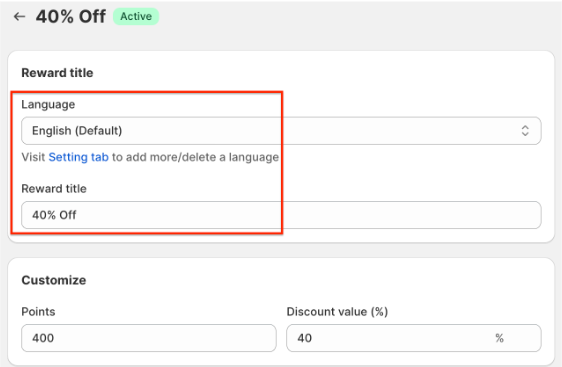
BON Pro Tip: If your website supports multiple languages, ensure you update the title for each language. BON’s multi-language display feature is available on the Basic plan and higher.
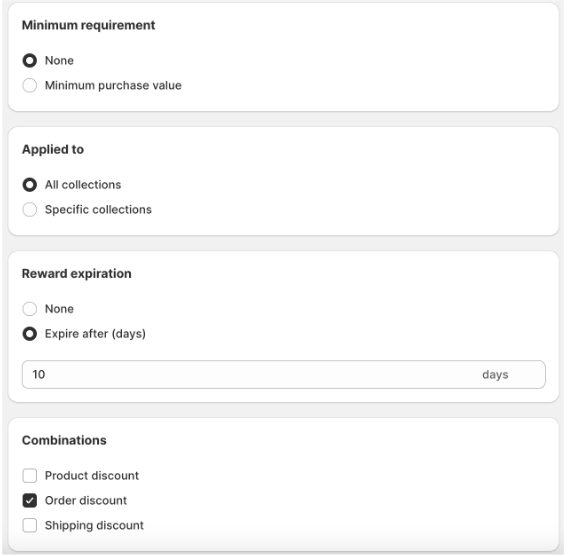
1. Minimum Purchase Requirement: Require customers to spend a minimum amount to apply the discount. Example: The discount can only be applied to purchases of $20 or more.
2. Product Restrictions: 割引を特定の商品コレクションに限定します。 Example: The discount can only be used on items from a particular collection.
3. Reward Expiration: 割引コードの有効期限を設定します。有効期限は、交換後すぐにカウントが開始されます。 Example: The code expires 10 days after redemption.
4. Combinations: Enable the discount to be combined with other types of discounts. Discounts in Shopify are categorized into classes, such as:
注意: BON triggers Shopify to create codes based on your in-app settings, so the discount combination logic is managed by Shopify. To learn more, you can visit the Shopify Discount Combinations documentation HERE.