This simple guide will walk you through the steps to set up Percentage Discounts effectively in BON.
Introduction
Offering a percentage discount is one of the most effective ways to attract customers and boost sales. BON Loyalty allows you to easily set up percentage discounts across all our plans, helping you offer enticing promotions to your customers.
Where and how to set up Percentage discounts
To create a Percentage Discount in BON Loyalty, follow these simple steps:
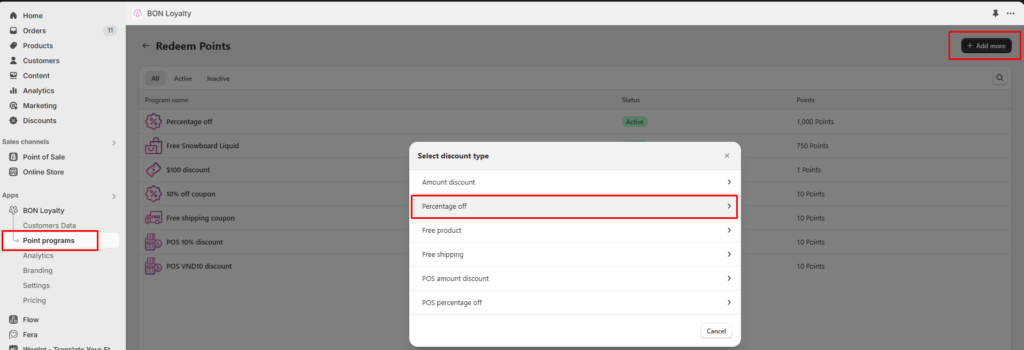
Navigate to BON > Point Programs > Redeem Points > Add More > Free product.
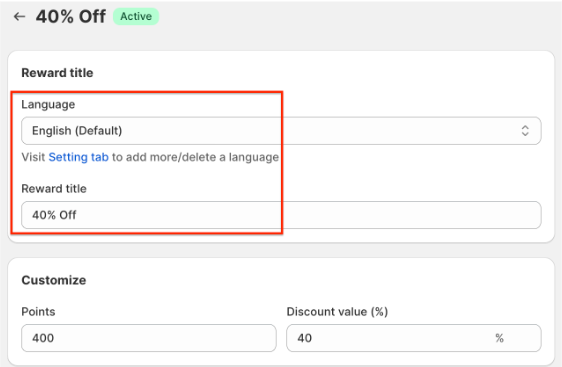
Enter a title for the reward. This title will be visible to your customers, so make it clear and appealing.
BON Pro Tip: If your website supports multiple languages, ensure you update the title for each language. BON’s multi-language display feature is available on the Basic plan and higher.
Set the Points-to-Discount ratio. Determine how many points your customers need to redeem for a percentage discount. For example, if you set it so that 400 points can be redeemed for a 40% discount, that’s what your customers will see and use.
Set additional conditions (optional)
To further customize your Percentage Discounts, you can set the following conditions:
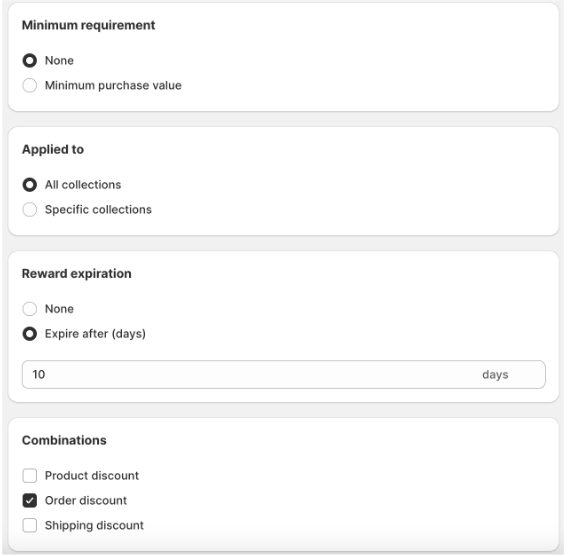
1. Minimum Purchase Requirement: Require customers to spend a minimum amount to apply the discount. Example: The discount can only be applied to purchases of $20 or more.
2. Product Restrictions: Limit the discount to specific product collections. Example: The discount can only be used on items from a particular collection.
3. Reward Expiration: Set an expiration date for the discount code, which begins immediately after it is redeemed. Example: The code expires 10 days after redemption.
4. Combinations: Enable the discount to be combined with other types of discounts. Discounts in Shopify are categorized into classes, such as:
Order Discount
Product Discount
Shipping Discount
You need to identify the discount classes and decide which ones can be combined.
Example: If you want a $100 discount (Order discount) to combine with a Free Product discount, check the box for “Product discount” in the Amount Discount settings. Then, in the Free Product discount settings, check the box for “Order discount.” Both discount classes need permission to combine, much like mutual consent in a partnership.
NOTE: BON triggers Shopify to create codes based on your in-app settings, so the discount combination logic is managed by Shopify. To learn more, you can visit the Shopify Discount Combinations documentation HERE.